
Nepal Bus Booking App: How to Book Baba Adventure Tickets on iPhone & Android
Nov 15, 2026
You know where you’re going and when, but you still don’t have a seat. Booking a bus in Nepal can mean calling an office, messaging an agent or going to a counter, and then waiting to hear whether there’s space.
That wait costs you. You can’t see which seats are left, so you don’t know if you’ll get the window seat or any seat at all. If the bus is full, you find out the day before you travel, when your hotel, your flight or your tour is already booked around it.
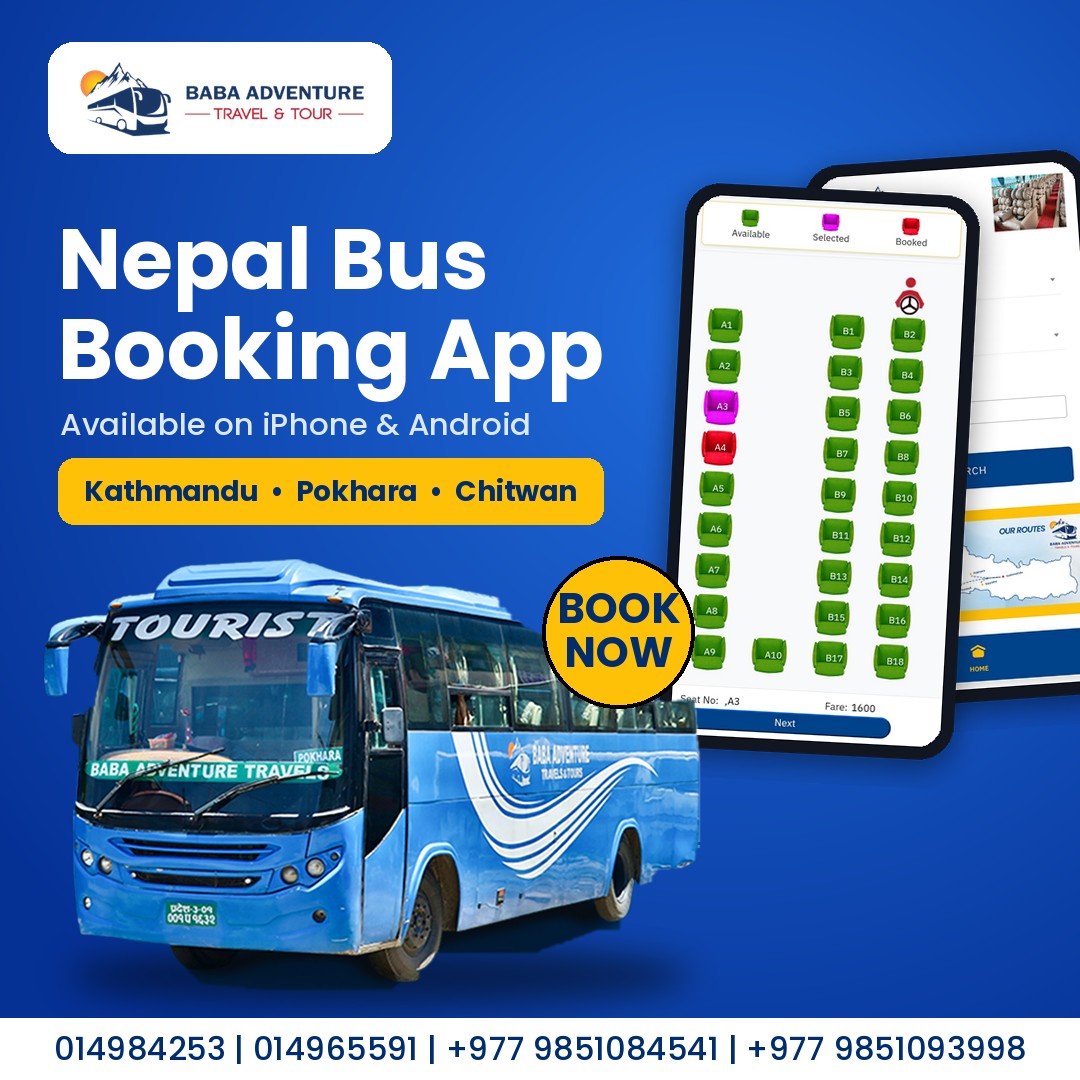
The Baba Adventure bus booking app takes that uncertainty away. Open it, pick your route and date, see real-time seat availability, choose your seat and pay with eSewa, Khalti, mobile banking or a Visa or Mastercard. Your e-ticket arrives on your phone, with no extra booking charges. The app is free on iPhone and Android, and the same booking works on our website if you’d rather use a computer.
Quick Answer
To book Baba Adventure bus tickets on your phone, download the Baba Adventure app on iPhone or Android, choose your route and date, pick your seat on the seat map, and pay by eSewa, Khalti, IME Pay, mobile banking, internet banking or Visa or Mastercard. You have 5 minutes to complete payment, and there are no extra booking charges. To book on a computer instead, use our website.
Nepal Bus Ticket App Download: iPhone & Android
The Baba Adventure app is free to download. Get it from the store for your phone:
- iPhone: open the App Store and search “Baba Adventure”, or download it here.
- Android: open Google Play and search “Baba Adventure”, or download it here.
Look for the Baba Adventure Travels & Tours logo, a blue bus in front of a mountain, so you know you’re installing the official app. Once it’s installed, open it and you can start searching routes straight away. You don’t need to pay anything to look at buses and seat availability.
How to Book Nepal Bus Tickets in the Baba Adventure App
Booking takes a few minutes. Here is the full process, in the order the app shows it.
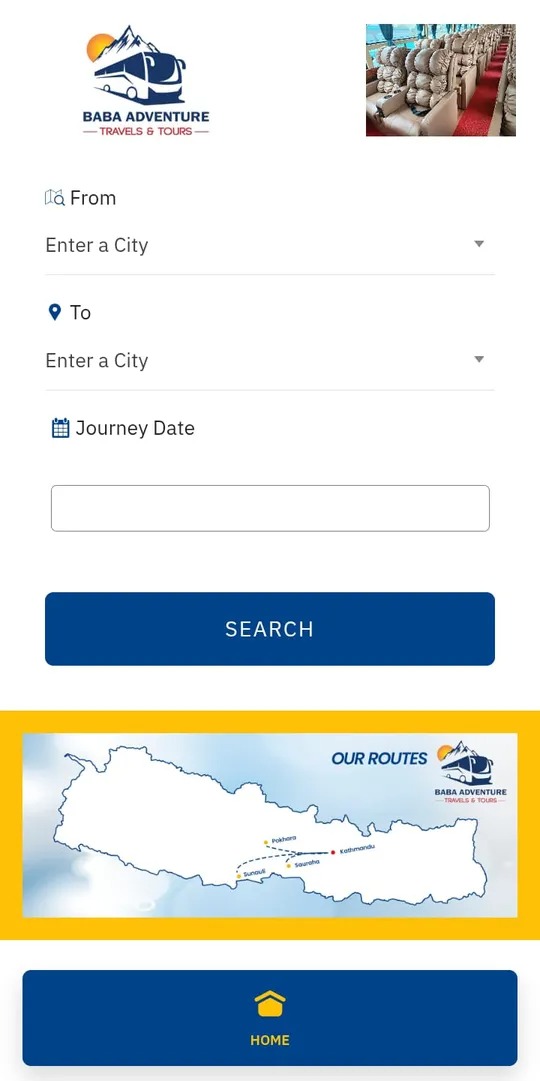
- Choose where you’re travelling from. Tap From and pick your starting city from the dropdown, for example Kathmandu, Pokhara or Chitwan.
- Choose your destination and date. Tap To and pick your destination. Then tap Journey Date and select the day you want to travel.
- Tap Search. The app lists the buses on that route and date. Use the arrows beside the date at the top to check the day before or after.
- Compare the buses. Each bus appears as a card showing its name, vehicle type, departure time, fare, any discount, and how many seats are still available out of the total. Tap the bus you want.
- Pick your seat. The seat map opens. Tap a seat, then tap Next. More on this below.
- Enter your details. Add the passenger’s name and contact number, then choose your boarding point and drop point from the dropdowns. Tap Next.
- Review your booking. The next screen shows your departure date, pickup and drop points, seat number, amount, any discount and the total you’ll pay. Read the red notes at the bottom before you pay.
- Pay. Choose eSewa, Khalti, IME Pay, mobile banking, internet banking or Visa or Mastercard. The pay button shows your total.
- Keep your ticket. Your ticket is confirmed once payment is received.
Choose Your Seat Online
Nepal bus seat selection online works from a seat map of the whole bus, with the driver at the top. Seats are colour-coded: green is available, pink is the seat you’ve selected and red is already booked. The bottom of the screen shows your seat number and the fare before you tap Next.
On the 2X1 sofa bus, the A seats are single seats on one side and the B seats are pairs on the other, 28 seats in all. If you’re travelling alone and want a seat to yourself, the singles are worth a look. Travelling together? Pick two seats next to each other in a B row. Booking early gives you more choice.
Boarding Points and Pickup Times
The app lists the boarding points for your route, with a pickup time beside each one, so you can choose the stop closest to you. On Pokhara to Kathmandu, for example, the list includes Tourist Bus Park, Prithivi Chowk, Amar Singh Chowk, Tal Chowk, Damauli and Dumre. Check the time next to your stop, because each one is different.
Before You Pay: Three Things to Know
- Reporting time: be at your boarding point 20 minutes before departure.
- Payment window: you have 5 minutes to complete payment. The red timer at the top of the booking screens counts it down, so have your wallet or card ready before you start.
- Cancellation terms: these appear on the review screen. Read them before you pay.
Your Nepal E-Ticket for the Bus
Once your payment is received, your ticket is confirmed and shows your ticket number and seat number. If payment fails or the confirmation doesn’t appear, contact the operator using the number on your ticket page. Keep a copy of your ticket on your phone, because you don’t need to print it.
Payment Options: Pay for Your Bus Ticket in the App
The app accepts the payment methods most travellers in Nepal already use. There are no extra booking charges, and you have 5 minutes to finish paying, so choose your method before you start.
eSewa: pick eSewa on the payment screen and the pay button shows your total. If you’re searching for eSewa bus ticket booking, this is how it works in the Baba Adventure app.
Khalti: choose Khalti to pay from your Khalti wallet. Khalti bus ticket booking works the same way as eSewa, from the same payment screen.
IME Pay: if you use IME Pay, you can select it from the same list.
Mobile banking and internet banking: pay straight from your bank account using your bank’s mobile banking app or internet banking.
Visa and Mastercard: you can pay by card, and the app listing says international Visa and Mastercard cards are accepted. This is the option to use if you’re visiting Nepal and don’t have a local wallet. It’s also the answer if you’re wondering how to pay for a Nepal bus ticket with a credit card.
Before You Pay
- Check your seat, boarding point and date on the review screen first.
- Make sure your wallet has enough balance, or have your card ready.
- Finish within the 5-minute payment time.
If payment goes through but you don’t see your confirmation, or if payment fails, contact the operator using the number on your ticket page.
Book Baba Adventure Bus Tickets Online on Our Website
Prefer a bigger screen, or don’t want to install an app? You can book the same tickets on babaadventure.com. The website has a booking box where you choose where you’re travelling from and to, pick your date and tap Search. From there you choose your bus and seat, enter your details and pay.
The website accepts eSewa, Khalti, Connect IPS, mobile banking and Visa or Mastercard. That means one extra option compared with the app: Connect IPS.
Whether you book on the app or the website, you get the same buses and the same e-ticket. For a full walkthrough of the website steps, read our guide to booking a tourist bus ticket in Nepal online.
Frequently Asked Questions
Is the Baba Adventure app free?
Yes. The app is free to download on iPhone and Android, and the app listing says there are no extra booking charges.
How do I book a bus ticket in the Baba Adventure app?
Open the app, choose where you’re travelling from and to, pick your date and tap Search. Choose your bus, pick your seat, enter the passenger’s details, and pay. Your ticket is confirmed once payment is received.
Can foreigners book bus tickets in Nepal online with this app?
Yes. You enter the passenger’s name and a contact number, and you can pay with an international Visa or Mastercard, so you don’t need a Nepali wallet.
Is it safe to book bus tickets online in Nepal?
Book only through the official Baba Adventure app or our website at babaadventure.com, and check that the app shows the Baba Adventure Travels & Tours logo. Your ticket is confirmed once payment is received, so keep it on your phone. If anything looks wrong, contact the team before you travel.
What payment methods does the app accept?
eSewa, Khalti, IME Pay, mobile banking, internet banking and Visa or Mastercard.
How long do I have to pay?
You have 5 minutes to complete payment. A red timer on the booking screens counts it down, so have your wallet or card ready.
Do I need to print my ticket?
No. Keep your ticket on your phone and show it when you board.
How early should I arrive?
Be at your boarding point 20 minutes before departure.
Can I choose my seat?
Yes. The seat map shows which seats are available, which one you’ve selected and which are booked.
Are there any discounts or offers?
Offers change. The review screen shows any discount that applies to your booking before you pay, so check it there.
Which routes can I book in the app?
The app covers Baba Adventure’s daily tourist bus routes. For each route’s current schedule and fare, see our daily tourist bus ticket page.
What if my payment fails or I don’t see my confirmation?
Contact the Baba Adventure team using the numbers on our website, and keep your payment details handy.
Contact us Directly
If you want to contact us immediately, please give us a ring on the given number.